
Overview
What is Midjourney?
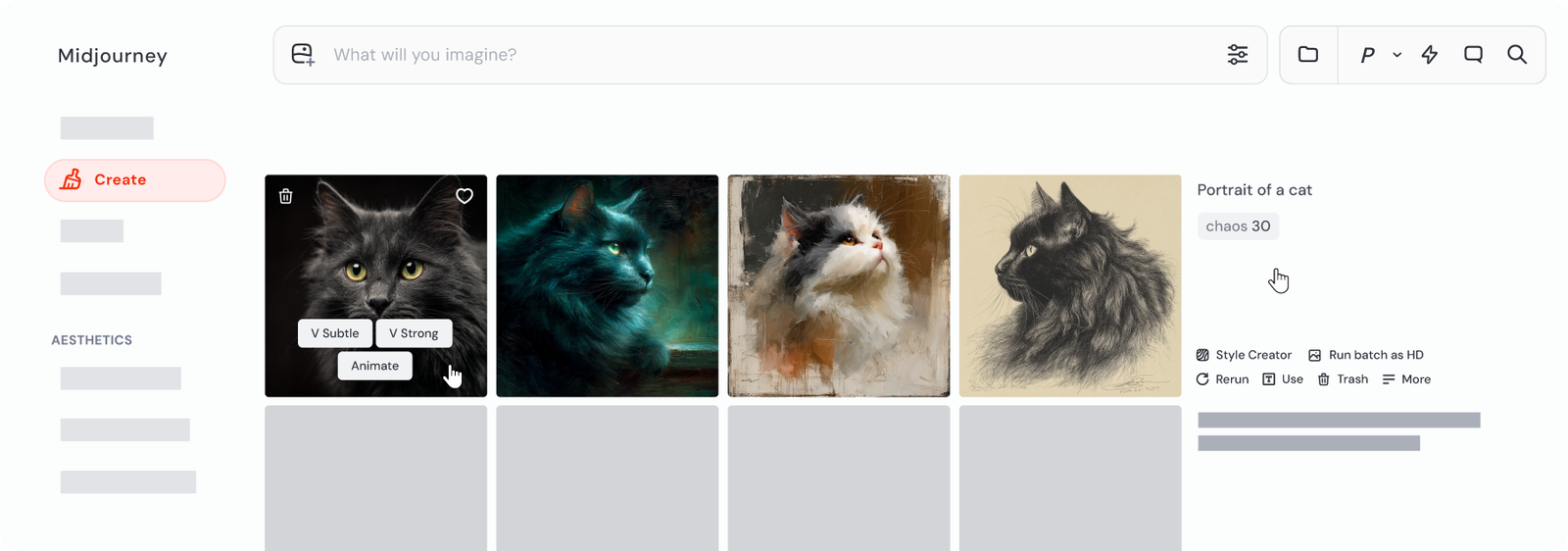
Midjourney is primarily an image-creation workflow, with connected tools for exploration, personalization, editing, organizing, and image-to-video animation. On the web, users can prompt from the Create page, upload images as image, style, or Omni References, and use an uploaded or generated image as a video starting frame. The official video documentation describes short five-second clips with optional prompt text and motion controls. Plan choice affects Fast GPU time, video resolution, concurrency, Relax-mode access, and privacy controls, so test the exact image and video workflow before committing to a production plan.
Good fit
Who should use Midjourney?
- Creative teams developing visual concepts, campaign art, moodboards, and distinctive image directions from prompts.
- Creators who need image prompts, Style References, Omni References, personalization, and an editor in one workflow.
- Users who want to animate a generated or uploaded image into a short video after first establishing the visual frame.
- Individuals who prefer working on the Midjourney website, Discord, or both with a single subscription.
Compare first
Who should compare alternatives first?
- Choose a dedicated video generator such as Runway when the main deliverable is longer or more fully directed video rather than image-led five-second animation.
- Compare Fast GPU time, video resolution, video concurrency, and Relax-mode eligibility at the exact subscription tier you need.
- Use Pro or Mega if privacy through Stealth Mode is a hard requirement; the official plan comparison limits it to those tiers.
- Confirm commercial-use terms for your organization, especially if annual gross revenue exceeds the threshold in Midjourney's terms guidance.
Use cases
Midjourney use cases
- Generate prompt-led concept art, illustrations, product visuals, and creative directions.
- Use image, style, and Omni References to guide a creation toward a subject, composition, or aesthetic.
- Create and organize visual explorations in the web Create, Explore, Personalize, Edit, and Organize surfaces.
- Animate a generated or uploaded still image into a short video with optional prompt and motion settings.
- Prepare visual starting frames that can be taken into a more video-first production workflow when needed.
Capabilities
Midjourney features
- Prompt-driven image generation on the web and in Discord.
- Image Prompts, Style References, and Omni References for guiding generated images.
- Create, Explore, Personalize, Edit, and Organize web workflows.
- Editor tools including Remix, inpainting, Pan, Zoom Out, layers, and retexturing where supported.
- Image-to-video animation that turns a still image into a five-second video with optional prompt and motion controls.
- Subscription controls for Fast and Relax GPU time, concurrency, video resolution, and Stealth Mode by tier.
Pricing
Midjourney pricing, plans, and credits
Midjourney sells recurring subscriptions rather than a permanent free plan. Its official plan comparison lists Basic at $10/month, Standard at $30/month, Pro at $60/month, and Mega at $120/month; annual billing is discounted by 20%. All tiers include Fast GPU time, while unlimited Relax image generations begin with Standard and unlimited Relax SD video generations are limited to Pro and Mega. Confirm current GPU usage, resolution, queue, and commercial-use rules before buying.
3.3 Fast GPU hours (200 minutes)
Individuals testing image creation and Fast-mode video.15 Fast GPU hours
Regular image creators who need more Fast time and Relax images.30 Fast GPU hours
High-volume creators who need privacy and Relax video.60 Fast GPU hours
Teams or intensive individual workflows needing more Fast capacity.Free plan and limits
Midjourney does not list a permanent free plan in its current subscription comparison. Users need a subscription to create; check the live product for any temporary trial or promotional access.
Credits and billing checks
- Confirm whether usage is metered by credits, minutes, generations, seats, or exports.
- Check whether free usage renews monthly or is a one-time allowance.
- Verify whether team seats share one usage pool or receive separate allowances.
- Review export limits, watermark rules, commercial rights, and cancellation terms before paying.
Verification notes
What to verify before choosing it
- Confirm current pricing and free plan limits on the official site.
- Test the output quality against your real workflow before scaling usage.
- Compare the tool against close competitors for pricing, features, and workflow fit.
Tradeoffs
Midjourney strengths and tradeoffs
Pros
- Combines strong image creation with reference, personalization, editing, and organization workflows.
- Lets users move from a generated or uploaded image into a short animated clip without switching products.
- Supports both website and Discord creation under the same subscription.
Cons
- There is no permanent free tier listed in the current official subscription comparison.
- Video is image-led and short, so it is not a replacement for a full video-production workspace.
- Fast GPU time, Relax access, privacy, and video capabilities vary materially by plan.
Recommendation
Should you use Midjourney?
Use Midjourney when the visual image is the center of the workflow and short animation is a natural follow-on. It is a good foundation for a future Midjourney vs Runway comparison: choose Midjourney for image-led exploration and references, and compare Runway when video duration, motion control, editing, or production workflow becomes the deciding factor.
Questions
FAQs of Midjourney
What is Midjourney?
Midjourney is a subscription-based platform for creating images and short videos from prompts, with website and Discord workflows plus references, personalization, editing, and organization tools.
Can Midjourney create videos?
Yes. Its official documentation describes turning a generated or uploaded image into a five-second video, with optional prompt text and motion controls.
Is Midjourney free?
The current official plan comparison lists paid subscriptions and does not list a permanent free tier. Check the live product for any temporary promotional access.
Which Midjourney plans include unlimited Relax video generations?
The official plan comparison says Pro and Mega include unlimited Relax SD video generations. Other plan tiers can generate videos in Fast Mode, subject to their plan limits.
When should I choose Midjourney instead of Runway?
Choose Midjourney when prompt-driven images, references, visual exploration, and short image animation lead the workflow. Compare Runway when your core need is a broader video-generation and production workflow.