
Overview
What is Haiper AI?
Haiper AI is an AI video and image generation platform with both creator app and developer API surfaces. Its official documentation covers Haiper Video 2.x and Haiper Video 1.5 generation, including text-to-video, image-to-video, keyframe conditioning, video-to-video, video enhancement, video extension, image generation, image upscaling, and API endpoints for generation status and user information. Haiper pricing is exposed as Web/iOS credits per generated second or image job, plus API pricing in USD per generated second or per image job.
Good fit
Who should use Haiper AI?
- Creators and teams that need text-to-video, image-to-video, keyframe-conditioned video, video-to-video, enhancement, extension, and AI image generation from one Haiper workspace.
- Developers building AI video features who need API endpoints for Haiper 2.0 text-to-video, image-to-video, keyframe conditioning, video-to-video, image generation, image upscaling, and generation-status checks.
- Video teams that want credit-based Web or iOS generation with transparent per-second pricing for Haiper Video 2.x, Haiper Video 1.5, and image-generation jobs.
- Creative experimenters who want to test prompt-based video, reference-image animation, keyframe control, image generation, and 1080p enhancement workflows before choosing a broader AI video stack.
- Product teams that need predictable API pricing in USD per generated second or per image job rather than only subscription-seat pricing.
Compare first
Who should compare alternatives first?
- Compare alternatives first if you need published subscription tiers, seats, or fixed monthly allowances; Haiper docs primarily expose credit-based Web/iOS pricing and USD-based API usage pricing.
- Compare alternatives first if generation budget must be simple for nontechnical users. Web and iOS generation is priced per second in credits, while API generation is priced per generated second or per image job.
- Compare alternatives first if your workflow needs only a beginner social-video editor. Haiper is closer to an AI generation model/workspace and API, not a template-heavy editing suite.
- Compare alternatives first if your team needs built-in captions, dubbing, avatars, script-to-video editing, or timeline production features; the official docs emphasize generation endpoints rather than full social-video post-production.
- Compare alternatives first if you need the same price for every mode. Haiper Video 2.x, Video 1.5, image generation, enhancement, and API models have different credit or USD rates.
Use cases
Haiper AI use cases
- Generate videos from text prompts using Haiper Video 2.x or Video 1.5.
- Animate a still image into video with image-to-video generation.
- Use keyframe conditioning to generate motion between controlled starting and ending frames.
- Transform existing footage with video-to-video generation.
- Enhance Haiper Video 1.5 outputs to 1080p where supported by the Web/iOS pricing table.
- Extend supported Haiper Video 1.5 videos at 720p or 540p resolution.
- Generate images from prompts through the Web/iOS app or API image-generation endpoint.
- Upscale generated or uploaded images using the official image-upscale endpoint.
- Build application workflows that submit a generation job, poll generation status, and retrieve results through Haiper API endpoints.
- Use transparent credit or USD-per-second rates to estimate cost for AI video experiments, prototypes, and product integrations.
Capabilities
Haiper AI features
- Haiper Video 2.x supports text-to-video at 720p and 540p through Web/iOS credit pricing.
- Haiper Video 2.x supports image-to-video at 720p and 540p through Web/iOS credit pricing.
- Haiper Video 2.x supports keyframe conditioning at 720p and video-to-video at 720p.
- Haiper Video 1.5 supports text-to-video, image-to-video, keyframe conditioning, 1080p enhancement, and video extension in the Web/iOS pricing table.
- Image generation supports multiple model choices, including Basic, Realistic, Anime, Artistic, Flux Schnell, Flux Dev, and custom-trained LoRA in the Web/iOS pricing table.
- API pricing includes Veo 3 at $0.75 per second with an 8-second duration according to the official API pricing page.
- API pricing includes Haiper 2.0 text-to-video, image-to-video, keyframe, and video-to-video endpoints with 720p or 1080p model options.
- API pricing includes Haiper 1.5 text-to-video, image-to-video, keyframe, and video extension options.
- Image API endpoints cover image generation and image upscale workflows.
- Generation status and user information endpoints support API integrations that need to monitor jobs and account balance.
- Official docs expose Web/iOS credit costs and API USD costs separately, helping separate creator app usage from developer usage.
Pricing
Haiper AI pricing, plans, and credits
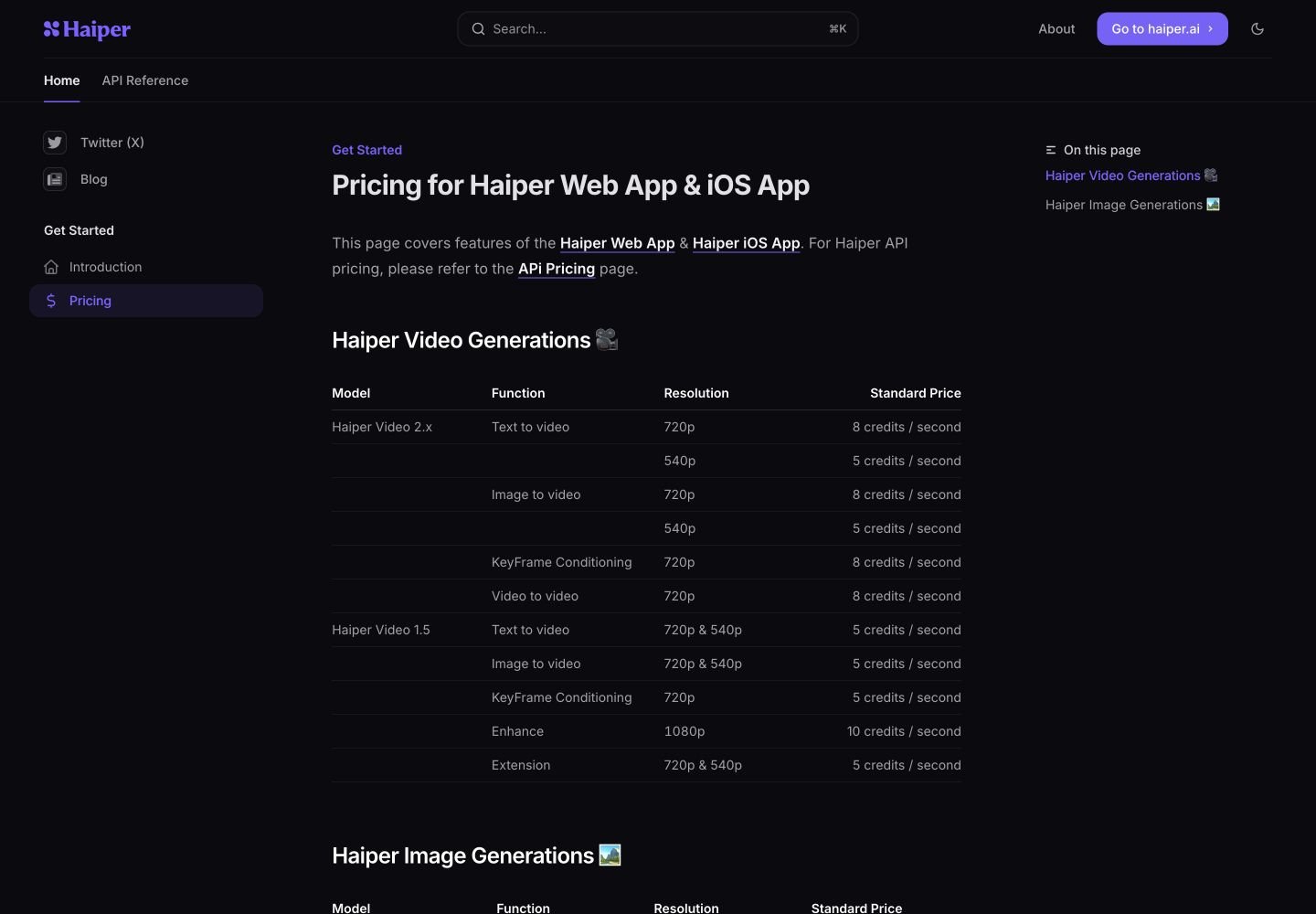
Haiper publishes separate pricing for the Web/iOS app and the API. Web and iOS generation is priced in credits per generated second or image job: Haiper Video 2.x text-to-video and image-to-video cost 8 credits per second at 720p and 5 credits per second at 540p, while keyframe conditioning and video-to-video are listed at 8 credits per second at 720p. Haiper Video 1.5 generation modes are generally listed at 5 credits per second for 720p and 540p, enhancement is 10 credits per second at 1080p, and extension is 5 credits per second. API pricing is listed separately in USD by model and endpoint, including Veo 3 at $0.75 per second and Haiper 2.0/1.5 video endpoints with model-specific per-second rates.
Text-to-video, image-to-video, keyframe, or video-to-video depending on mode
Creators using higher-resolution app generation.Text-to-video or image-to-video
Lower-credit app generation tests.Text-to-video, image-to-video, keyframe, or extension
Lower-cost generation and extension workflows.1080p enhancement
Upscaling or improving generated video output.Image generation by selected model
Prompt-based image generation and visual ideation.Model-specific API rates
Developers integrating AI video generation into products.Image generation or upscale API usage
Developers integrating image workflows.Free plan and limits
Public Haiper docs emphasize credit-based Web/iOS generation and API usage pricing; no stable public free-plan allowance is listed in the pricing documentation used for this page.
Credits and billing checks
- Confirm whether usage is metered by credits, minutes, generations, seats, or exports.
- Check whether free usage renews monthly or is a one-time allowance.
- Verify whether team seats share one usage pool or receive separate allowances.
- Review export limits, watermark rules, commercial rights, and cancellation terms before paying.
Verification notes
What to verify before choosing it
- Confirm current pricing and free plan limits on the official site.
- Test the output quality against your real workflow before scaling usage.
- Compare the tool against close competitors for pricing, features, and workflow fit.
Tradeoffs
Haiper AI strengths and tradeoffs
Pros
- Clear official pricing tables for Web/iOS credits and API USD usage.
- Broad generative-video modes: text-to-video, image-to-video, keyframe conditioning, video-to-video, enhancement, and extension.
- Developer-friendly API coverage for submitting generation jobs, checking status, generating images, upscaling images, and reading user info.
- Useful for teams evaluating both creator app workflows and programmatic AI video integration.
Cons
- Official public docs emphasize credit and API usage pricing more than simple subscription plan packaging.
- Cost planning requires understanding per-second and per-image rates across several models and modes.
- Haiper is less of an all-in-one social editor than tools focused on captions, templates, avatars, dubbing, and timeline editing.
- The current official homepage may not reliably show a full marketing hero in all browser sessions, so docs and API pages are more stable source references.
Community evidence
Reddit and community signals
Community discussion around Haiper is mostly evaluation-oriented: users compare it with other AI video generators for prompt adherence, motion quality, output usability, generation cost, and whether the API pricing is practical for product workflows.
Sentiment: Mixed/experimental: useful for AI video generation and API evaluation, but buyers should compare output quality, cost per second, retry rates, and missing post-production features.
Recommendation
Should you use Haiper AI?
Haiper AI is worth shortlisting if you need a transparent AI video generation stack with text-to-video, image-to-video, keyframe conditioning, video-to-video, enhancement, extension, image generation, and API endpoints. It is especially relevant for teams comparing model capabilities and API economics. Compare Runway, Kling, Pika, Luma, Google Veo, Hailuo, or PixVerse first if you need stronger published creator plans, social-video editing, avatars, captions, dubbing, or a more template-driven production workflow.
Questions
FAQs of Haiper AI
What does Haiper AI do?
Haiper AI is an AI video and image generation platform with Web/iOS app pricing and developer API endpoints. Official docs cover text-to-video, image-to-video, keyframe conditioning, video-to-video, video enhancement, video extension, image generation, image upscaling, generation-status checks, and user account information.
Is Haiper AI free?
Haiper documentation focuses on credit-based Web/iOS usage and API usage pricing rather than a simple public free-plan table. The public pricing page lists generation costs in credits per second for app usage, while API pricing is listed in USD per generated second or per image job.
How much does Haiper AI cost?
For Web and iOS, Haiper Video 2.x costs 8 credits per second at 720p and 5 credits per second at 540p for text-to-video and image-to-video; Haiper Video 1.5 generally costs 5 credits per second for supported 720p/540p generation and 10 credits per second for 1080p enhancement. API pricing includes model-specific USD rates such as Veo 3 at $0.75 per second.
Does Haiper AI have an API?
Yes. Haiper provides API documentation for text-to-video, image-to-video, keyframe-conditioned video, video-to-video, image generation, image upscaling, video-generation status checks, and user information endpoints.
What video modes does Haiper support?
The official pricing and API docs list text-to-video, image-to-video, keyframe conditioning, video-to-video, enhancement, and extension across Haiper Video 2.x and Haiper Video 1.5, with available resolutions and prices varying by model and mode.
Who should compare Haiper alternatives first?
Compare alternatives first if you need a packaged monthly creator plan, built-in social editing, captions, avatars, dubbing, or a template-heavy workflow. Haiper is stronger for generative-video modes, credit-transparent generation, and API integration than for full social-video post-production.